Hi All,
Greetings.
Today, I’m sharing a major update regarding the retirement of Exchange Web Services (EWS) and how to generate a report identifying the applications that use EWS.
Major Update : Exchange Web Services (EWS) in Exchange Online will retire starting October 1, 2026.
Details
- Exchange Web Services (EWS) in Exchange Online will begin retirement on October 1, 2026, with full retirement beginning April 1, 2027.
Action to be performed in our Organization
- Identify the applications and services currently using EWS in our organization.
- Review EWS usage reports in tenant.
- Review Message center communications related to EWS usage and retirement.
- If we do not have message in message center (search for – “Update active Exchange Web Services Applications” in Inbox or Archive) we likely do not have EWS usage in our tenant and are not impacted by this deprecation.
How to review EWS usage
- Navigate to Microsoft 365 admin center – https://admin.cloud.microsoft/#/homepage
- From left pane, navigate to Reports >> Usage
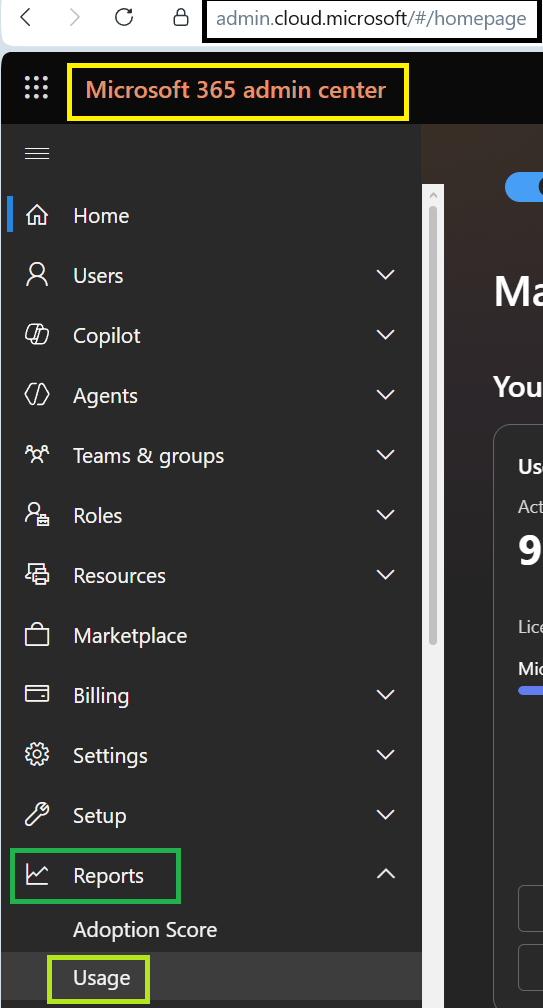
- Select the “Exchange” from the left pane.
- We will be redirected to “EWXWeeklyUsage” page.
- From “EWXWeeklyUsage“, select the “EWS usage” tab as shown in image below.
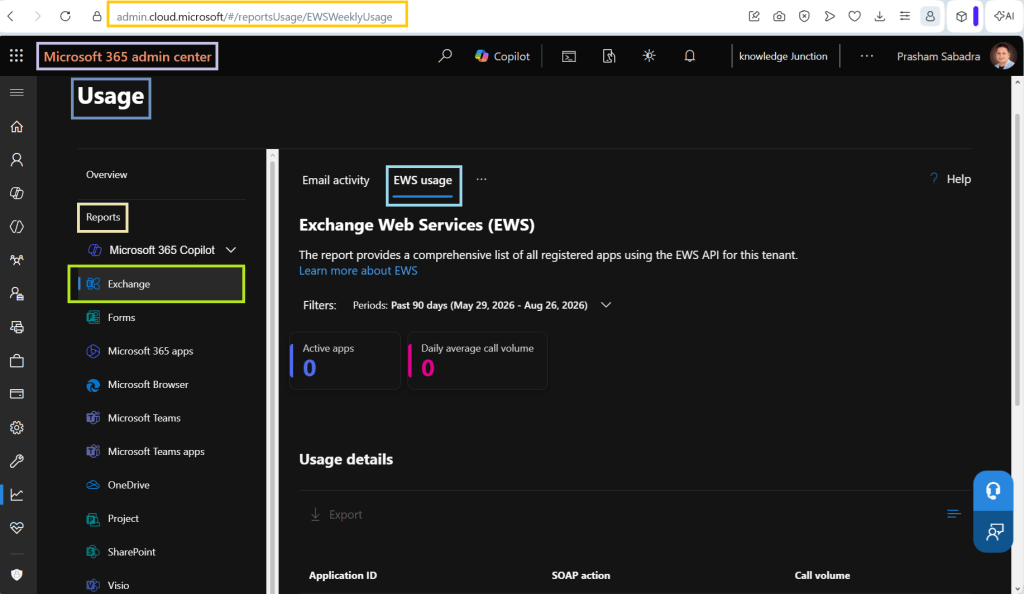
- On “EWXWeeklyUsage” page under “EWS usage”, we will see the details of EWS usage.
- Active Apps
- Daily average call volume
- Usage Details
- Application ID
- SOAP action
- Call Volume
There is PowerShell script also available to know – Which Azure AD app registrations in my tenant have EWS permissions, and are they still being used
References
- Exchange Web Services (EWS) usage report
- Notes From the Field: Finding and Remediating EWS App Usage Before Retirement
- Exchange-App-Usage-Reporting
Thank you for reading!
Feel free to discuss anything about PowerShell, SharePoint, Microsoft 365. Have a great time ahead! LIFE IS BEAUTIFUL 🙂


Leave a Reply